EZGPT.APP
Connect to Local LLMs Effortlessly
A powerful browser extension that connects you to local LLM instances like LMStudio, Ollama, and any OpenAI-compatible API. Chat with AI models directly from your browser with complete privacy.
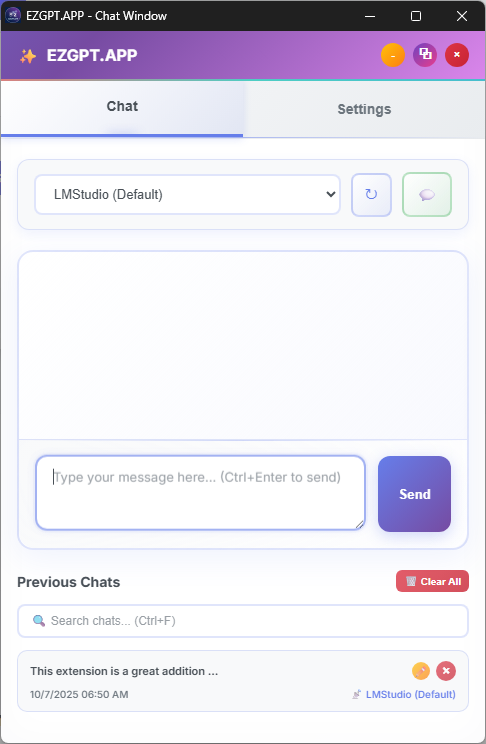
Connect to Local LLMs Effortlessly
A powerful browser extension that connects you to local LLM instances like LMStudio, Ollama, and any OpenAI-compatible API. Chat with AI models directly from your browser with complete privacy.
Connect to LMStudio, Ollama, and other local AI models running on your machine for complete privacy.
Works with any OpenAI-compatible API, including GPT-3.5, GPT-4, Claude, and custom endpoints.
Intuitive chat interface with searchable history, conversation renaming, and one-click new chat functionality.
Easy provider setup with context window configuration, connection testing, and organized settings panels.
Automatic token estimation and smart context truncation to prevent API errors while maintaining conversation flow.
Popup or detached window modes with customizable themes, multiple color schemes, and adjustable density.
Efficient shortcuts for power users: Ctrl+Enter to send, Alt+1-9 for providers, Ctrl+F to search.
Provider-specific chat history, persistent settings, and local storage - all private and secure.
Launch EZGPT in a separate, resizable window for better multitasking and side-by-side workflows.
Personalize your experience with light/dark/auto themes, color schemes, font sizes, and density options.
Search chat history, rename conversations, and filter by provider for efficient chat management.
Smart token management, context awareness, and efficient API usage for smooth conversations.
Collapsible interface panels, granular configuration options, and workspace customization.
Local data storage, no telemetry, and complete control over your conversations and settings.
Get EZGPT.APP with a single click from the official Chrome Web Store. No manual setup required - just install and start chatting with AI!
Free • No registration required • Available now
ollama pull llama2ollama serveEZGPT.APP works with any OpenAI-compatible API endpoint. Simply configure:
Use the "Test Connection" button to verify your settings work correctly.
Run models locally with an easy-to-use interface
Local
Lightweight local model runner for various architectures
LocalGPT-3.5, GPT-4, and other OpenAI models
CloudClaude models via Anthropic API
CloudAny OpenAI-compatible API endpoint
CustomAll chat history and settings are stored locally in your browser. Nothing is sent to external servers except your configured AI providers.
Use local AI models for complete privacy. Your conversations never leave your machine when using local providers like LMStudio or Ollama.
The extension doesn't collect any usage data, analytics, or personal information. Your privacy is completely protected.
Download EZGPT.APP and start chatting with AI models locally and privately.
Free • No registration required • Works offline